Best Monitor for Nintendo Switch 2026
Top picks for docked gaming, portable monitors, and budget options
Recommended Products
Based on our research, here are some top picks:
LG 32GN650-B UltraGear Gaming Monitor -

$359.99 on Amazon
ASUS ROG Swift OLED PG27AQDP 27" Gaming Monitor -

$798.77 on Amazon
Samsung Odyssey G55C Gaming Monitor -

$214.99 on Amazon
Dell UltraSharp U2723QE 4K Monitor -

$659.00 on Amazon
As an Amazon Associate, we earn from qualifying purchases.
Quick Navigation
Nintendo Switch Display Specifications
Before choosing a monitor, understand what the Switch can actually output:
Switch Output Capabilities
| Mode | Resolution | Frame Rate | Connection |
|---|---|---|---|
| Docked (TV Mode) | Up to 1080p | 60fps max (many games 30fps) | HDMI via dock |
| Handheld | 720p (built-in screen) | 60fps max | N/A |
| Tabletop | 720p (built-in screen) | 60fps max | N/A |
Important Limitations
- - No 1440p or 4K: Switch maxes at 1080p. Higher res monitors show 1080p upscaled.
- - No high refresh rate: Switch is locked to 60Hz. 144Hz monitors work but provide no benefit for Switch.
- - No VRR: Switch doesn't support FreeSync/G-Sync.
- - No HDR: Switch doesn't output HDR signals.
What this means: You don't need an expensive high-end monitor for Switch. A good 1080p 60Hz monitor with low input lag is perfect. Save your money or invest in a monitor that also works well for PC gaming.
Best Monitors for Nintendo Switch
ASUS VG248QG

$199.99 on Amazon
Resolution: 1920x1080
Size: 24 inches
Panel: TN, 165Hz
Input Lag: ~4ms
Response: 0.5ms (MPRT)
Price: $199.99
Excellent for competitive Switch games like Smash Bros and Splatoon 3. Ultra-low input lag ensures responsive controls. The 165Hz is wasted on Switch but makes this great for PC gaming too. ELMB (blur reduction) helps with motion clarity.
Check Price on AmazonLG 24GS65F-B

$194.54 on Amazon
Resolution: 1920x1080
Size: 24 inches
Panel: IPS, 180Hz
Input Lag: ~5ms
Response: 1ms GtG
Price: $194.54
IPS panel delivers vibrant colors perfect for Nintendo's colorful games like Mario, Zelda, and Pokemon. Wide viewing angles let friends watch comfortably. Fully adjustable stand and HDR10 support (though Switch doesn't use it). Great value.
Check Price on AmazonASUS VG279Q1A

$212.99 on Amazon
Resolution: 1920x1080
Size: 27 inches
Panel: IPS, 165Hz
Input Lag: ~4ms
Response: 1ms MPRT
Price: $212.99
If you want more screen real estate, 27" at 1080p still looks acceptable for Switch at typical desk distance. IPS colors make Nintendo games pop. Good for couch gaming setups where you sit further back.
Check Price on AmazonBudget Options Under $150
Since Switch maxes at 1080p 60Hz, budget monitors work perfectly fine:
AOC 24G2E
Incredible value. IPS colors, low input lag, frameless design. Perfect for Switch and doubles as a great budget PC gaming monitor.
BenQ GW2480
60Hz is all Switch needs. BenQ's eye-care features reduce strain during long gaming sessions. Built-in speakers (basic but functional). Great office/Switch dual-use.
Sceptre E248W-19203R
Ultra-budget option that gets the job done. Built-in speakers eliminate need for external audio. Not the best colors but totally fine for casual Switch gaming.
Best Portable Monitors for Switch
Portable monitors let you play Switch on a bigger screen anywhere - hotels, offices, or just moving between rooms.
ASUS ZenScreen MB16AC

$169.00 on Amazon
Size: 15.6 inches
Resolution: 1920x1080
Panel: IPS
Connection: USB-C (needs adapter for Switch)
Weight: 1.7 lbs
Price: $169.00
Premium portable monitor with excellent IPS panel. Includes smart cover that doubles as stand. Requires USB-C to HDMI adapter for Switch dock. Battery-free design (powered by USB-C).
Check Price on AmazonKYY 15.6" Portable Monitor

$66.49 on Amazon
Size: 15.6 inches
Resolution: 1920x1080
Panel: IPS
Connection: HDMI + USB-C
Built-in Speakers: Yes
Price: $66.49
Includes both HDMI and USB-C - connect directly to Switch dock's HDMI. Built-in speakers mean no extra cables needed. Ships with a premium smart cover and screen protector. Outstanding value for Switch-specific portable gaming.
Check Price on AmazonINNOCN 15.6" OLED
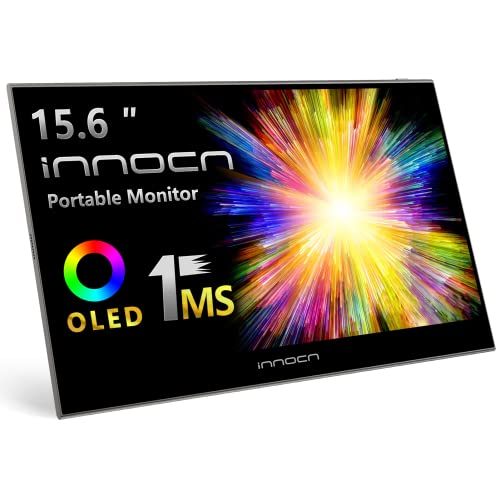
$161.49 on Amazon
Size: 15.6 inches
Resolution: 1920x1080
Panel: OLED
Connection: Mini HDMI + USB-C
HDR: Yes
Price: $161.49
OLED portable monitor for the best possible colors and contrast. Switch can't use HDR, but the OLED panel still looks stunning. Perfect blacks make games like BOTW look incredible.
Check Price on AmazonConnection Note: Switch dock outputs HDMI. Many portable monitors use USB-C. You'll need either: (1) a portable monitor with HDMI input, (2) an HDMI to USB-C adapter, or (3) a third-party dock that outputs USB-C video.
Best Dual-Use Monitors (Switch + PC Gaming)
If you also PC game, get a monitor that excels at both:
ASUS VG27AQ1A - Best All-Around
1440p for sharp PC gaming, Switch outputs 1080p (slightly upscaled but fine). ELMB Sync for motion clarity. Great colors for Nintendo games. Excellent for both platforms.
LG 27GR83Q-B - Best IPS Colors
Nano IPS delivers exceptional colors - Nintendo games look amazing. 1440p for PC, 1080p for Switch. Fast response times for both competitive PC and Switch gaming.
Gigabyte M27Q - Best Value Dual-Use
Built-in KVM switch lets you easily toggle between PC and Switch inputs. Type-C connectivity. Great value for a versatile gaming setup.
What to Look For in a Switch Monitor
Resolution
1080p is ideal. Higher resolutions (1440p, 4K) won't look better since Switch maxes at 1080p - they just upscale. 1080p saves money and matches Switch's native output perfectly.
Size
24-27" is the sweet spot. At these sizes, 1080p looks sharp. 32"+ at 1080p can look pixelated up close. For portable monitors, 15-17" balances screen size with portability.
Input Lag
Under 10ms is ideal for responsive gaming. Critical for Smash Bros, Splatoon 3, Mario Kart, and other competitive games. Most modern gaming monitors achieve this easily.
Panel Type
- IPS: Best colors for Nintendo's vibrant games. Recommended for most Switch users.
- VA: Better contrast for games with dark areas. Good for evening gaming.
- TN: Fastest response, but colors are worse. Only if you're hyper-competitive.
Built-in Speakers
Convenient for casual gaming without headphones or external speakers. Quality varies - don't expect great audio, but it's fine for most Nintendo games.
Frequently Asked Questions
What resolution does Nintendo Switch output?
Maximum 1080p (1920x1080) when docked. Switch OLED also maxes at 1080p docked. Handheld mode is 720p. The Switch doesn't support 1440p or 4K.
Does Nintendo Switch support high refresh rate monitors?
No. Switch is locked to 60Hz maximum (many games run at 30fps). 144Hz+ monitors won't improve Switch gaming but are fine to use - the monitor just runs at 60Hz.
What size monitor is best for Nintendo Switch?
24-27 inches is ideal for desk setups. At these sizes, 1080p looks sharp. Larger monitors (32"+) may show pixelation. For portable setups, 15-17" works great.
Does input lag matter for Nintendo Switch?
Yes, especially for competitive games like Smash Bros, Splatoon 3, and Mario Kart. Look for under 10ms input lag. Most gaming monitors achieve this easily.
Can I use a portable monitor with Nintendo Switch?
Yes! Portable monitors work great with Switch. Use HDMI from the dock, or USB-C with compatible docks/adapters. 1080p portable monitors with low input lag are ideal.
Related Guides
Not Sure Which Monitor Is Right for You?
Take our quick quiz and get a personalized recommendation in under 2 minutes.