Best OLED Gaming Monitors 2026
The ultimate display technology for gaming: perfect blacks, instant response times, and stunning colors
Recommended Products
Based on our research, here are some top picks:
LG 32GN650-B UltraGear Gaming Monitor -

$359.99 on Amazon
ASUS ROG Swift OLED PG27AQDP 27" Gaming Monitor -

$798.77 on Amazon
Alienware AW2725DF (G80SD) Gaming Monitor -

$995.00 on Amazon
Dell UltraSharp U2723QE 4K Monitor -

$659.00 on Amazon
As an Amazon Associate, we earn from qualifying purchases.
Table of Contents
Why Choose OLED for Gaming?
OLED (Organic Light-Emitting Diode) represents the pinnacle of display technology for gaming. Unlike LCD monitors that require a backlight, each OLED pixel produces its own light and can turn completely off for perfect blacks.
OLED Advantages
-
✓
Infinite Contrast
Perfect blacks (0 nits) vs LCD's ~1000:1
-
✓
0.03ms Response Time
Virtually zero ghosting or smearing
-
✓
Perfect Viewing Angles
No color shift from any angle
-
✓
Wide Color Gamut
100%+ DCI-P3, vivid HDR colors
-
✓
No Backlight Bleed
Perfect uniformity in dark scenes
OLED Considerations
-
!
Burn-In Risk
Static images over thousands of hours
-
!
Lower Peak Brightness
250-450 nits full screen vs 500-1000+ LCD
-
!
Higher Cost
Premium pricing ($800-$2000+)
-
!
ABL (Auto Brightness Limiter)
Dims during full-screen white content
-
!
Text Fringing
QD-OLED may show color fringing on text
OLED vs Mini-LED for Gaming
Mini-LED offers higher brightness (1000+ nits) and no burn-in risk, but OLED wins in response time, contrast, and viewing angles. For dark room gaming and competitive play, OLED excels. For bright rooms and productivity, Mini-LED may be better. See our full comparison.
QD-OLED vs W-OLED: Which Is Better?
Two OLED technologies dominate the gaming monitor market, each with distinct characteristics:
| Feature | QD-OLED (Samsung) | W-OLED (LG Display) |
|---|---|---|
| Technology | Blue OLED + Quantum Dots | White OLED + Color Filters |
| Color Gamut | 175% sRGB, wider coverage | 150% sRGB, excellent |
| Peak HDR Brightness | 1000-1300 nits (3% window) | 800-1000 nits |
| Full-Screen Brightness | 250-400 nits | 300-450 nits |
| Text Clarity | Color fringing possible | Cleaner WRGB subpixels |
| Uniformity | Good | Generally better |
| Used By | Alienware, Samsung, MSI | LG, ASUS, Corsair |
| Best For | Gaming, HDR content | Gaming + productivity mixed use |
QD-OLED Text Fringing Explained
QD-OLED uses a triangular subpixel arrangement that can cause colored fringing on text (especially on light backgrounds). Most people don't notice it during gaming, but it can be visible during desktop/productivity work. W-OLED's WRGB layout produces cleaner text.
Our Recommendation
- Choose QD-OLED if: Gaming is primary use, you want maximum color saturation and HDR pop
- Choose W-OLED if: You do significant productivity work, want cleaner text, or prefer LG's proven tech
Quick Picks: Best OLED Monitors by Category
Best Overall OLED
Editor's ChoiceLG UltraGear 27GS93QE
27" | 1440p | 240Hz | W-OLED | 0.03ms

$559.80 on Amazon
The perfect balance of size, resolution, and refresh rate. W-OLED delivers stunning visuals with cleaner text than QD-OLED alternatives. Anti-glare coating helps in lit rooms.
Check Price on AmazonBest for Competitive Gaming
FastestASUS ROG Swift PG27AQDP
27" | 1440p | 480Hz | W-OLED | 0.03ms
$798.77 on Amazon
World's fastest OLED at 480Hz. Built for esports with NVIDIA G-Sync, custom fan cooling, and extreme motion clarity. The ultimate competitive edge.
Check Price on AmazonBest 4K OLED
Most DetailedAlienware AW2725DF (G80SD)
32" | 4K | 240Hz | QD-OLED | 0.03ms
$995.00 on Amazon
Stunning 4K resolution with QD-OLED's vibrant colors. 240Hz is exceptional for 4K gaming. Samsung's Tizen smart TV features built-in.
Check Price on AmazonBest Ultrawide OLED
Most ImmersiveAlienware AW3425DW
34" | 3440x1440 | 240Hz | QD-OLED | 0.03ms

$799.99 on Amazon
The curved QD-OLED ultrawide that started the revolution. Perfect for immersive single-player games and productivity. Gorgeous 1800R curve.
Check Price on AmazonBest Value OLED
Budget PickLG UltraGear 27GS93QE
27" | 1440p | 240Hz | W-OLED | 0.03ms
$559.80 on Amazon
Current-gen LG W-OLED at its best price. The same stunning 1440p 240Hz panel as our top pick, regularly found under $600 on sale: exceptional value.
Check Price on AmazonBest OLED for Competitive Gaming
For esports and competitive play, OLED's instant pixel response eliminates the ghosting that plagues even the fastest LCD monitors. Here are our top picks for competitive gaming:
1. ASUS ROG Swift PG27AQDP
27" 1440p 480Hz W-OLED
$798.77
on Amazon
$798.77 on Amazon
Pros
- + 480Hz - fastest OLED monitor available
- + Custom cooling fan prevents OLED thermal throttling
- + NVIDIA G-Sync module for tear-free gaming
- + Excellent uniformity (LG W-OLED panel)
- + Built-in KVM switch
Cons
- - Premium price for 480Hz
- - Fan noise (though quiet)
- - Requires powerful GPU for 480Hz
Best for: CS2, Valorant, Apex Legends, and anyone who needs the absolute fastest display.
Check Price on Amazon2. LG UltraGear 27GS93QE
27" 1440p 240Hz W-OLED
$559.80
on Amazon
$559.80 on Amazon
Pros
- + 240Hz is plenty for most competitive gamers
- + Anti-glare coating (not glossy)
- + Clean text for mixed use
- + Excellent HDR implementation
- + DisplayPort 2.1 ready
Cons
- - "Only" 240Hz vs 360Hz and 480Hz competition
- - Anti-glare reduces contrast slightly
Best for: Competitive gamers who also do productivity work and want cleaner text.
Check Price on Amazon3. Alienware AW2725DF
27" 1440p 360Hz QD-OLED
$620.95
on Amazon

$620.95 on Amazon
Pros
- + 360Hz QD-OLED alternative to ASUS
- + Superior color saturation vs W-OLED
- + Dell's excellent warranty and support
- + Iconic Alienware design
Cons
- - QD-OLED text fringing
- - Glossy coating can have reflections
- - No built-in cooling fan
Best for: Competitive gamers who prioritize color vibrancy and prefer QD-OLED's look.
Check Price on AmazonPro Tip: GPU Requirements
To maintain 240-360fps at 1440p in competitive games, you'll need at least an RTX 4070 Super or RX 7800 XT. At lower settings (which most pros use anyway), mid-range GPUs can hit these framerates in CS2 and Valorant.
Best OLED for Immersive Gaming
For single-player adventures, RPGs, and cinematic experiences, larger screens and higher resolutions let you truly appreciate OLED's perfect blacks and HDR capabilities.
1. Alienware AW2725DF (G80SD)
32" 4K 240Hz QD-OLED
$995.00
on Amazon
$995.00 on Amazon
Pros
- + Stunning 4K resolution on OLED
- + 240Hz incredible for 4K panel
- + QD-OLED's vibrant colors for HDR
- + Smart TV features (Tizen, apps, no PC needed)
- + Samsung's anti-reflection coating
Cons
- - Requires RTX 4080+ for 4K/240Hz
- - 32" might feel small for some at 4K
- - QD-OLED text fringing at high PPI
Best for: Elden Ring, Cyberpunk 2077, Baldur's Gate 3, games where detail and atmosphere matter most.
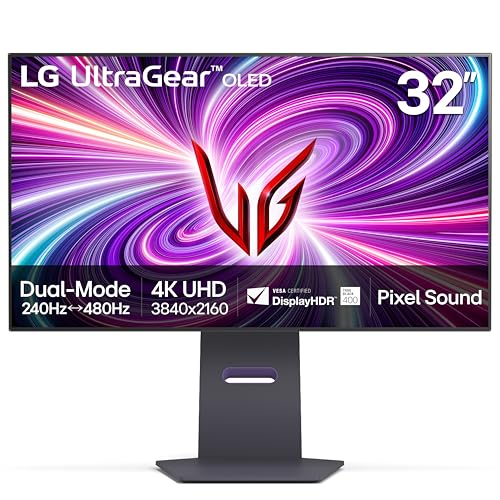
Check Price on Amazon2. LG UltraGear 32GS95UE-B
32" 4K 240Hz W-OLED (Dual Mode)
$1,002.75
on Amazon
$1,002.75 on Amazon
Pros
- + Dual Mode: 4K/240Hz OR 1080p/480Hz
- + W-OLED cleaner text than QD-OLED
- + Better uniformity vs Samsung
- + DisplayPort 2.1 for future GPUs
Cons
- - 1080p/480Hz mode less useful (pixel blurry)
- - Higher price than Samsung
- - Less vibrant than QD-OLED
Best for: Gamers who want 4K OLED with better text clarity for mixed gaming/work use.
Check Price on Amazon3. ASUS ROG Swift PG32UCDM
32" 4K 240Hz QD-OLED
$849.00
on Amazon

$849.00 on Amazon
Pros
- + ROG Swift build quality and features
- + Customizable OLED care settings
- + Better color accuracy tuning
- + ASUS reliability and support
Cons
- - Same QD-OLED text issues
- - No smart TV features
Best for: Enthusiasts who want premium build quality and advanced OSD features.
Check Price on AmazonBest OLED Ultrawide Monitors
Ultrawide OLED combines immersion with productivity. The curved panels wrap around your vision for unparalleled gaming experiences.
1. Alienware AW3425DW
34" 3440x1440 240Hz QD-OLED Curved
$799.99
on Amazon
$799.99 on Amazon
The monitor that revolutionized OLED gaming. The 1800R curve on a 34" QD-OLED is stunning. Perfect balance of size and performance for most desks.
Best for: Immersive gaming AND productivity. Great for flight sims, racing games, and RPGs.
Check Price on Amazon2. Samsung Odyssey OLED G9 (G95SD)
49" 5120x1440 240Hz QD-OLED Curved
$1,197.99
on Amazon

$1,197.99 on Amazon
The ultimate super ultrawide experience. 32:9 aspect ratio replaces dual monitors. 240Hz is exceptional for this size. Not for competitive play but incredible for sim racing and immersion.
Best for: Sim racing, flight simulators, and anyone who wants to replace dual monitors with one curved canvas.
Check Price on Amazon3. LG UltraGear 45GS95QE-B
45" 3440x1440 240Hz W-OLED Curved
$1,249.00
on Amazon

$1,249.00 on Amazon
Massive 45" ultrawide with 800R tight curve. W-OLED provides cleaner text than QD-OLED at this size. 240Hz is excellent for a panel this large.
Best for: Users who want W-OLED benefits in ultrawide format, or those who find 34" too small.
Check Price on AmazonOLED Burn-In: Facts vs Fiction
The Truth About Burn-In in 2026
Modern OLED monitors have come a long way. Burn-in is possible but requires thousands of hours of static content. For typical gaming use with varying content, the risk is minimal. Most manufacturers now offer burn-in warranties.
Built-in Protections
- Pixel Shift: Subtly moves image to prevent static wear
- Pixel Refresher: Runs periodically to even out pixel wear
- ABL: Dims static bright elements
- Logo Detection: Dims detected logos/HUDs
- Screen Savers: Auto-activate after inactivity
Best Practices
- Vary Content: Don't display same HUD 24/7
- Use Dark Themes: Black pixels = off pixels = no wear
- Hide Taskbar: Auto-hide Windows taskbar
- Enable Protections: Don't disable pixel shift
- Moderate Brightness: Lower OLED light reduces wear
Burn-In Warranty Coverage
| Brand | Burn-In Warranty | Notes |
|---|---|---|
| LG | 2 years (monitors) | Explicit burn-in coverage |
| Alienware | 3 years | Premium Support included |
| Samsung | 3 years | Includes burn-in |
| ASUS | Varies | Check specific model |
Test Your OLED Monitor
Use our free testing tools to check for dead pixels, uniformity issues, and response time performance on your new OLED.
Frequently Asked Questions
Is OLED burn-in still a problem for gaming monitors?
Modern OLED gaming monitors have significantly improved burn-in prevention with pixel refreshers, ABL (Auto Brightness Limiter), and pixel shift technology. For typical gaming use (varying content), burn-in risk is minimal. However, static HUD elements displayed for thousands of hours could still cause image retention. Most manufacturers now offer multi-year burn-in warranties.
What's the difference between QD-OLED and W-OLED?
QD-OLED (Quantum Dot OLED) uses blue OLED emitters with quantum dot color conversion, producing wider color gamut (up to 175% sRGB) and higher peak brightness. W-OLED uses white OLED with color filters, offering more mature technology and often better availability. QD-OLED generally has better color saturation while W-OLED can have slightly better uniformity and cleaner text.
Are OLED monitors worth it for competitive gaming?
Yes, OLED monitors excel at competitive gaming due to their near-instant 0.03ms response times (virtually eliminating ghosting and motion blur), perfect black levels for dark scene visibility, and high refresh rates up to 480Hz. The only downsides are higher cost and potential burn-in concerns with static HUDs.
How bright are OLED gaming monitors compared to LCD?
OLED monitors typically peak at 250-450 nits for full-screen brightness, lower than premium LCDs (500-1000+ nits). However, OLEDs can hit 1000+ nits for HDR highlights on small portions of the screen. Due to infinite contrast, OLED appears brighter than the numbers suggest, but may struggle in very bright rooms.
What size OLED gaming monitor should I get?
OLED gaming monitors come primarily in 27-inch (1440p), 32-inch (4K), 34-inch ultrawide, and 45-49 inch super ultrawide sizes. For competitive gaming, 27-inch 1440p 240Hz+ models offer the best balance. For immersive gaming, 32-inch 4K or 34-inch ultrawide provides stunning visuals. Consider desk space and viewing distance.
Related Guides
Not Sure Which Monitor Is Right for You?
Take our quick quiz and get a personalized recommendation in under 2 minutes.