Best Microphone for Streaming 2026: Top Picks for Twitch & YouTube
Updated 2026 | By TestBeforeYouBuy Team
Quick Summary
Audio quality is often more important than video for stream retention - viewers will tolerate lower video quality but quickly leave streams with bad audio. The best streaming microphones deliver clear, broadcast-quality voice while rejecting background noise and keyboard clicks. This guide covers the top picks from USB plug-and-play options to professional XLR setups.
Affiliate Disclosure: We may earn a commission when you purchase through links on this page. This doesn't affect our recommendations - we only recommend products we've thoroughly researched and believe provide good value.
Top Streaming Microphone Picks
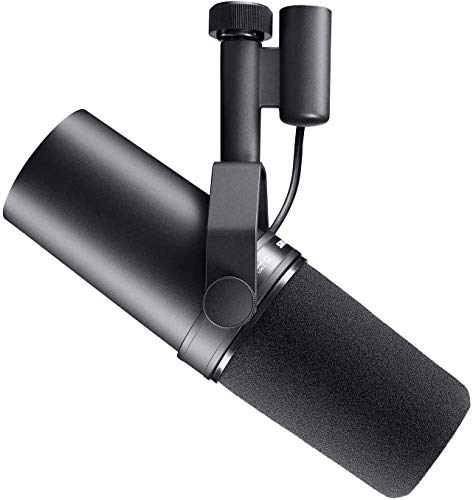
Shure SM7B
Industry standard dynamic mic, exceptional noise rejection, broadcast quality, the professional choice.
$439.00
Elgato Wave:3
Premium USB condenser, Clipguard technology, Wave Link software, built for streaming.

$169.99
Fifine K669B
Under $30, USB plug-and-play, metal build, surprisingly good quality for the price.

$29.99
Rode PodMic
Broadcast dynamic mic, great noise rejection, internal pop filter, excellent value XLR option.

$86.00
Shure MV7+
USB-C/XLR hybrid, dynamic capsule, SM7B-inspired, great for untreated rooms.

$299.00
Audio-Technica AT2020USB-X
Studio condenser quality, headphone monitoring, mix control, proven performer.

$169.00
What Matters in a Streaming Microphone
A good streaming microphone balances voice quality, noise rejection, and ease of use. Here's what to prioritize:
Voice Quality
- Frequency Response: 50Hz-15kHz covers human voice well
- Clarity: Clear mids are most important for speech
- Warmth: Some coloration can sound more professional
- Presence: Slight high-end boost helps cut through game audio
Noise Rejection
- Polar Pattern: Cardioid rejects rear/side noise
- Dynamic vs Condenser: Dynamic better for noisy rooms
- Proximity Effect: Close-mic technique reduces room noise
- Keyboard Noise: Off-axis placement helps
Ease of Use
- USB: Plug-and-play, no extra equipment
- XLR: Requires interface but more flexible
- Software: Good companion software adds features
- Physical Controls: Mute button, gain knob on mic
Build & Mounting
- Weight: Heavier mics need sturdier boom arms
- Shock Mount: Reduces desk vibration noise
- Thread Size: Standard 5/8" or 3/8" for most mounts
- Pop Filter: Built-in or external for plosives
Best Overall: Shure SM7B
The Shure SM7B is the broadcast industry standard, used by everyone from Joe Rogan to major radio stations. Its dynamic capsule and excellent noise rejection make it the gold standard for streaming.
Why It's The Best
- Broadcast Quality: Rich, warm voice reproduction
- Noise Rejection: Excellent rejection of room noise and electromagnetic interference
- Versatility: Works for voice, instruments, and more
- Durability: Built to last decades with proper care
- Pro Standard: Immediately recognizable "radio" sound
Important: The SM7B needs significant gain. Pair it with a Cloudlifter CL-1 or audio interface with 60+ dB of clean gain like the Focusrite Scarlett series.
Best USB: Elgato Wave:3
The Elgato Wave:3 was built specifically for streaming, with features like Clipguard anti-distortion and deep integration with streaming software.
Streaming-First Features
- Clipguard: Prevents audio distortion from loud sounds
- Wave Link Software: Virtual audio mixer for OBS integration
- Capacitive Mute: Touch-sensitive mute button
- LED Indicators: Visual feedback for gain and mute status
- Compact Design: Small footprint, great for desk setups
Best for: Streamers who want premium USB quality with streaming-specific features. The Wave Link software is particularly useful for managing multiple audio sources.
Best Budget: Under $50 Options
You can get surprisingly good audio quality without spending much. These budget options punch above their weight class.
Budget Tier Options
- Fifine K669B (~$30): Best under $30, metal body, USB plug-and-play
- Tonor TC-777 (~$30): Includes pop filter and boom arm
- Maono AU-A04 (~$40): Full kit with shock mount and arm
- Blue Snowball iCE (~$45): Iconic design, reliable performance
Pro Tip: Budget microphones benefit enormously from proper positioning. Get a $15-20 boom arm to position the mic 6-12 inches from your mouth, off-axis from your keyboard.
Best XLR: Rode PodMic
For streamers ready to upgrade to XLR, the Rode PodMic delivers broadcast-quality dynamic performance at an accessible price point.
Why Go XLR?
- Better Preamps: Audio interfaces have cleaner, more powerful gain
- Expandability: Add more mics, instruments, effects
- Lower Latency: Direct monitoring through interface
- Mic Selection: Access to professional microphone options
- Durability: XLR connections are more robust
Best Dynamic USB: Shure MV7+
The Shure MV7+ combines the noise rejection of a dynamic microphone with USB convenience, plus XLR output for future upgradeability.
Hybrid Flexibility
- USB + XLR: Use either connection, upgrade path built-in
- Dynamic Capsule: Excellent noise rejection for untreated rooms
- SM7B Heritage: Similar sound signature to the industry standard
- ShurePlus MOTIV: Desktop app for EQ and compression
- Touch Panel: Capacitive controls for gain and mute
Best for: Streamers in untreated rooms who want dynamic mic benefits with USB convenience. The upgrade path to XLR makes it future-proof.
USB vs XLR: Which Should You Choose?
| Factor | USB | XLR |
|---|---|---|
| Setup Complexity | Plug and play | Requires audio interface |
| Cost | Mic only ($50-200) | Mic + interface ($150-500+) |
| Audio Quality Ceiling | Very good | Professional studio |
| Flexibility | Limited to one mic | Multiple inputs, routing |
| Monitoring | Software (latency) | Direct (zero latency) |
Recommendation: Start with USB. Upgrade to XLR when you specifically need features USB can't provide, like multiple mic inputs or professional-grade audio processing.
Dynamic vs Condenser: Room Matters
Dynamic Microphones
- Pros: Rejects room noise, durable, no phantom power
- Cons: Less detail, needs more gain, close-mic required
- Best for: Untreated rooms, noisy environments, keyboards nearby
- Examples: Shure SM7B, Rode PodMic, Shure MV7+
Condenser Microphones
- Pros: More detail, wider frequency response, sensitive
- Cons: Picks up room noise, needs quiet environment
- Best for: Treated rooms, quiet spaces, vocal detail
- Examples: Elgato Wave:3, AT2020USB-X, Blue Yeti
Key Insight: If you stream from a bedroom with hard walls and no acoustic treatment, a dynamic mic will sound better than a condenser. Condensers excel in treated spaces.
Microphone Setup Tips
Proper setup is often more important than the microphone itself. Follow these tips for the best sound:
Essential Setup Tips
- Distance: 6-12 inches from your mouth for optimal sound
- Angle: Slightly off-axis (not directly in front) reduces plosives
- Boom Arm: Gets mic off desk (vibration) and into position
- Pop Filter: Essential for plosives (p, b sounds) on condensers
- Gain Staging: Set gain so peaks hit -12 to -6 dB
- OBS Settings: Use noise suppression and noise gate filters
Essential Microphone Accessories
Boom Arm
Essential for proper mic positioning. Gets mic off desk and in front of your face.

$94.00

Audio Interface
Required for XLR mics. Provides clean gain and low-latency monitoring.

$224.99
Frequently Asked Questions
Should I get a USB or XLR microphone?
For most streamers, USB microphones offer the best value. They're plug-and-play with no additional equipment needed. XLR offers better quality and flexibility but requires an audio interface. Start with USB, upgrade to XLR when audio becomes a priority.
Is the Blue Yeti still good in 2026?
The Blue Yeti remains solid for beginners, but newer options like the Elgato Wave:3 and Rode NT-USB Mini offer better value. The Yeti's pickup pattern can capture too much room noise without acoustic treatment.
What's the difference between dynamic and condenser microphones?
Dynamic microphones are less sensitive and reject background noise better - ideal for untreated rooms. Condenser microphones capture more detail but also pick up more room noise. For streaming in a bedroom, dynamic mics are often better.
Do I need a boom arm for streaming?
A boom arm is highly recommended. It positions the mic closer to your mouth, off your desk (reducing vibration), and out of your camera frame. Budget boom arms work fine - you don't need to spend over $30-50.
Why does my stream audio sound bad?
Common issues: mic too far away (should be 6-12 inches), gain too high (causes clipping), room echo (use dynamic mic or add treatment), wrong OBS settings. Test your audio in recordings before going live.
Can I use a headset mic for streaming?
You can, but dedicated microphones sound significantly better. Headset mics are convenient but lack the audio quality viewers expect from serious streamers. Upgrade to a USB mic when you're ready to improve your production value.